Why Your AI Images Look Wrong And How To Fix Them
The Anatomy of AI Image Failures
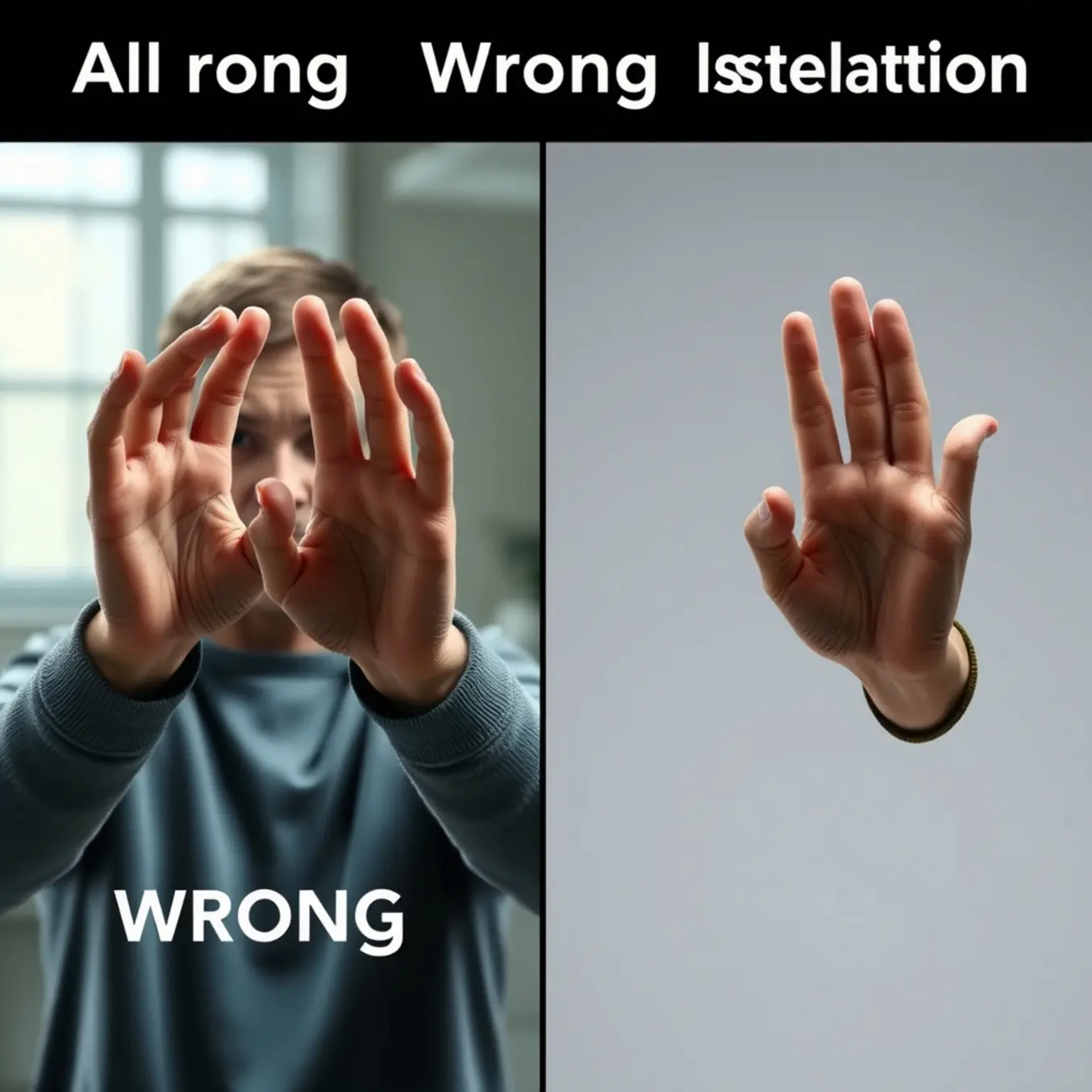
AI image generators consistently struggle with rendering anatomically correct human hands, creating images with extra fingers, distorted proportions, or unnatural angles. This limitation stems from several fundamental challenges in how current AI models process visual information.
Unlike humans who understand hands as functional units with specific joint relationships, AI models learn from statistical patterns in training data. Hands appear in countless positions and perspectives across training images, making it difficult for the AI to develop a consistent internal model of hand anatomy. Additionally, hands often occupy small portions of training images, receiving less attention during the learning process.
According to research from TechCrunch, the complexity of hand articulation presents a particular challenge. Each hand contains 27 bones and numerous possible configurations, creating a combinatorial explosion that current models haven’t fully mastered. This explains why AI-generated hands often feature impossible finger arrangements or incorrect numbers of digits.
The Text Generation Problem
AI models similarly struggle with rendering coherent text within images. While they can mimic the visual appearance of letters, they frequently produce garbled words, nonsensical phrases, or characters that resemble multiple letters simultaneously.
This occurs because AI image generators process text as visual patterns rather than semantic content. As noted by MIT Technology Review, these systems lack true understanding of language structure and meaning. They recognize that certain shapes often appear together in text but cannot comprehend spelling, grammar, or word boundaries.
The challenge is compounded by the fact that text represents a tiny fraction of most training datasets. Since most images don’t contain prominent text, the models receive insufficient examples to learn consistent letter formation and spatial relationships between characters.
Background Inconsistencies
AI models often struggle with maintaining logical consistency across entire scenes. You might notice impossible shadows, conflicting light sources, or backgrounds that don’t logically connect with foreground elements. These inconsistencies occur because the AI processes different image regions somewhat independently, without maintaining a coherent understanding of physical space.
Morphological Blending
Another common issue involves objects blending unnaturally with their surroundings or with other objects. A person’s hair might merge with a background wall, or a tree might appear to grow through a building. This happens because the AI’s understanding of object boundaries relies on statistical correlations rather than true comprehension of separate entities.
Research from Ars Technica explains that these artifacts reveal how diffusion models work by adding and removing noise rather than constructing scenes from understood components. The process can create convincing textures and colors while failing to maintain structural integrity.
The Hand Horror Show – Fixing Finger Nightmares
AI image generators frequently produce distorted hands with extra fingers, fused digits, or unnatural angles because of how they process visual information. These systems analyze images in patches rather than understanding anatomical structure, making complex articulated forms like hands particularly challenging. Additionally, training datasets often contain images where hands are small or partially obscured, providing insufficient examples for the AI to learn proper hand anatomy.
The statistical nature of diffusion models means they’re predicting pixel patterns rather than creating structurally sound forms. When generating hands, the AI must coordinate multiple joints, proportions, and perspectives simultaneously—a task that often exceeds its current capabilities. This explains why you might see seven-fingered monstrosities or hands bending in impossible directions in your AI art.
Prompt Engineering Solutions for Better Hands
Strategic prompt engineering can significantly improve hand generation by providing clearer guidance to the AI. Start by specifying hand positions explicitly—instead of “a person standing,” try “a person standing with hands at their sides, fingers relaxed.” Be precise about finger count and arrangement: “five distinct fingers on each hand, naturally spaced” helps override the AI’s default assumptions.
Incorporate anatomical references directly into your prompts. Phrases like “anatomically correct hands,” “professionally photographed hands,” or “hands with perfect proportions” signal higher quality expectations. You can also reference specific hand types: “slender pianist hands” or “strong working hands” provide more concrete visual anchors than generic descriptions.
Negative prompting proves equally valuable for hand improvement. Explicitly exclude common errors with phrases like “no extra fingers,” “no deformed hands,” “no fused digits,” or “no malformed joints.” Some users find success with technical terms like “no polydactyly” (the medical term for extra digits) to filter out specific abnormalities.
Post-Processing Tools to Rescue Problematic Hands
When prompt engineering alone doesn’t suffice, several post-processing tools can salvage your AI-generated hands. Photoshop’s Generative Fill allows you to select problematic areas and regenerate them with more specific instructions. For more advanced control, tools like Krita with AI plugins offer targeted regeneration of selected regions while preserving the rest of your composition.
Dedicated AI photo editors provide specialized hand-correction features. These tools often include hand-specific models trained exclusively on proper hand anatomy, enabling you to replace distorted hands with anatomically correct versions while maintaining artistic style consistency. Some platforms even offer “hand templates” you can adjust to match your character’s pose and proportions.
For quick fixes, inpainting tools within most AI image generators allow you to mask problematic hands and regenerate them with refined prompts. This iterative approach—generate, identify issues, mask, regenerate—often produces better results than attempting perfect generation in a single step. Many artists combine multiple tools, using one for initial generation and another for targeted refinement of challenging elements like hands.
Advanced Techniques for Professional Results
Serious AI artists employ more sophisticated methods to achieve consistently good hands. Creating custom LoRAs (Low-Rank Adaptations) trained specifically on hand images can dramatically improve your results. By fine-tuning the model on hundreds of properly photographed hands in various positions, you essentially teach the AI your preferred hand style.
ControlNet integration represents another powerful approach. Using pose estimation models or depth maps, you can guide the hand generation process with structural skeletons. This provides the AI with explicit spatial information about finger placement and joint angles, significantly reducing deformation issues. Some artists even create 3D hand models to generate perfect reference poses for their AI artwork.
Meanwhile, exploring different AI art styles can sometimes circumvent hand issues altogether. Certain artistic treatments—like watercolor effects, abstract interpretations, or strategic cropping—can minimize the emphasis on detailed hands while maintaining overall visual appeal.
Text Troubles – When AI Can’t Spell
AI image generators can produce stunning visuals but often fail at rendering coherent text. This limitation stems from how these models learn and process information. Unlike humans who understand language structure, AI models primarily recognize visual patterns in pixel data.
These systems analyze millions of image-text pairs during training, focusing on overall visual composition rather than textual accuracy. Consequently, they learn to approximate text as visual shapes without comprehending spelling, grammar, or semantic meaning. The result is often garbled text that resembles writing but lacks coherence.
The Technical Challenges Behind AI Text Generation
Several technical factors contribute to this limitation. First, most image generators use diffusion models that work at relatively low resolutions, making precise text rendering difficult. Additionally, these models lack dedicated text recognition or generation modules that would enable proper spelling and grammar.
Another significant challenge involves the training data itself. While datasets contain countless images with text, the models don’t learn to associate specific letter sequences with meaningful words. Instead, they learn statistical patterns of how letters typically appear together, leading to plausible-looking but nonsensical text outputs.
Creative Workarounds for Text Integration
For immediate needs, consider these practical alternatives:
- Generate images without text using platforms like Pictomuse’s AI tools and add text during post-production
- Use symbolic or abstract representations instead of literal text
- Incorporate text-like elements that enhance the visual aesthetic without requiring readability
- Explore different AI art styles that work well with minimal text elements
Meanwhile, researchers continue working on solutions. Some teams are developing multi-modal models that better integrate text understanding with image generation. Others are creating specialized training approaches that teach AI systems to recognize and reproduce text more accurately.
As these technologies evolve, we can expect gradual improvements in AI’s text-handling capabilities. However, for now, combining AI generation with traditional design methods remains the most reliable approach for creating images with readable, coherent text.
Artifact Annihilation – Cleaning Up Visual Noise
AI-generated images often contain various types of visual artifacts that can detract from their quality. These imperfections typically fall into several categories, each requiring different approaches for effective removal. Understanding these artifact types is the first step toward cleaner, more professional-looking results.
Texture and Pattern Distortions
One of the most common issues in AI-generated images involves strange textures and repetitive patterns that don’t align with realistic surfaces. These artifacts often appear as swirling patterns, checkerboard effects, or unnatural textures that make images look artificial. According to research from Stanford University’s Computer Vision Lab, these distortions frequently occur when AI models struggle with spatial consistency and texture synthesis.
Meanwhile, another study published in Nature Scientific Reports found that texture artifacts are particularly prevalent in diffusion-based models when the denoising process doesn’t properly account for local coherence. These distortions can make otherwise impressive AI creations appear amateurish and unconvincing.
Color Banding and Gradient Issues
Color banding represents another significant challenge in AI-generated visuals. This artifact appears as visible steps or bands in what should be smooth color gradients, particularly in skies, shadows, and gradient backgrounds. The Cornell University Graphics Group explains that banding occurs when the color depth is insufficient to represent smooth transitions, creating a posterized effect.
Additionally, color inconsistencies and unnatural hue shifts can plague AI-generated images. These issues often stem from the training data limitations or improper color space handling during generation. Research from the ACM Digital Library indicates that color artifacts are particularly problematic in images requiring subtle atmospheric effects or complex lighting scenarios.
Advanced Post-Processing Methods
Several sophisticated techniques can effectively reduce or eliminate visual artifacts from AI-generated images. High-quality upscaling represents one of the most powerful approaches, as it can smooth out texture distortions and reduce compression artifacts. Tools like Adobe Photoshop’s AI-powered Super Resolution have demonstrated remarkable success in cleaning up noisy AI outputs while preserving important details.
Furthermore, dedicated denoising algorithms specifically designed for AI-generated content have emerged as valuable solutions. The Computer Vision Foundation recently published research showing how diffusion models can be repurposed to remove artifacts while maintaining image integrity. These approaches work by learning the characteristics of clean images and applying this knowledge to noisy inputs.
In-Painting and Localized Correction
For localized artifacts affecting specific image regions, in-painting techniques offer targeted solutions. Modern AI-powered in-painting tools can seamlessly replace problematic areas with contextually appropriate content. A study from IEEE Transactions on Image Processing demonstrated that adaptive in-painting algorithms achieve superior results for removing isolated artifacts compared to global filtering methods.
Selective sharpening and blurring represent additional strategies for artifact management. Strategic application of sharpening can clarify details obscured by compression artifacts, while careful blurring can smooth out texture inconsistencies. The key lies in applying these adjustments selectively rather than globally, as emphasized in research from the Computer Vision and Image Understanding journal.
Advanced Pro-Tips for Perfect AI Images
Creating a perfect AI image is rarely a one-and-done process. Instead, it involves a cycle of generation, analysis, and refinement. The initial prompt provides a foundation, but the true magic often happens in the subsequent iterations. For example, if an image of a “futuristic city” appears too dark, your next prompt could be “the same futuristic city at sunrise, with gleaming glass towers.” This approach allows you to correct specific elements without starting from scratch, honing in on your vision with precision.
Many advanced AI art platforms, such as Midjourney, have features built specifically for this workflow, allowing you to create variations or upscale specific parts of an image. This method of progressive detailing is a cornerstone of professional AI artistry, transforming a good initial concept into a polished final piece.
Strategic Tool Combination for Maximum Impact
No single AI tool is perfect for every task. Professionals often use a combination of specialized tools to achieve superior results. You might generate a base image in a platform like DALL-E 3, known for its ability to accurately interpret complex prompts, and then enhance its resolution or apply a specific artistic style using a different AI. Furthermore, traditional editing software like Adobe Photoshop remains invaluable for final touches, compositing multiple AI-generated elements, or correcting minor flaws that the AI might have introduced.
This hybrid workflow leverages the unique strengths of each tool. For instance, you could explore the top AI art styles of 2025 in one generator and then use another AI-powered tool to seamlessly transfer that style onto a different base image you’ve created.
Building a Personal Prompt Library
Efficiency and consistency are hallmarks of a professional workflow. Instead of crafting every prompt from scratch, seasoned AI artists maintain a personal library of effective prompts and prompt components. This library acts as a repository of proven formulas, style descriptors, and compositional keywords that you know yield good results. You can organize this library by categories such as:
- Artistic Styles: “in the style of cyberpunk,” “photorealistic,” “watercolor illustration.”
- Lighting and Atmosphere: “cinematic lighting,” “soft morning mist,” “dramatic shadows.”
- Composition: “rule of thirds,” “extreme close-up,” “wide-angle landscape shot.”
Using a note-taking app or a dedicated spreadsheet to catalog these elements saves immense time and helps you develop a signature style. Over time, you can mix and match these components to rapidly generate new ideas and maintain a high-quality, consistent output across your projects. This systematic approach turns prompt engineering from a guessing game into a repeatable, scalable process [Source: Creative Bloq].
Mastering Negative Prompts
An often overlooked but powerful technique is the use of negative prompts—telling the AI what you *don’t* want to see. This is crucial for eliminating common AI artifacts like distorted hands, blurry text, or unwanted watermarks. By explicitly excluding these elements, you guide the AI away from its common failure modes and toward a cleaner result. For instance, adding “`–no blurry, deformed fingers, text, signature`” to a prompt can dramatically improve the image’s professionalism. Mastering this technique gives you greater control and reduces the number of failed generations.
Preventive Measures and Best Practices
Beyond correction techniques, implementing preventive measures can significantly reduce artifact generation from the outset. Choosing appropriate AI art styles that align with your generation tools’ strengths can minimize many common issues. Some styles naturally produce cleaner results with specific AI models, making style selection an important consideration.
Additionally, optimizing generation parameters before creating images can prevent many artifacts from appearing. Research from Papers with Code shows that adjusting sampling steps, guidance scale, and resolution settings can dramatically reduce distortion generation. Proper prompt engineering also plays a crucial role, as clearer instructions help AI models produce more coherent outputs with fewer artifacts.
Finally, maintaining awareness of your specific AI tool’s limitations enables more strategic generation approaches. Different models exhibit distinct artifact tendencies, and understanding these patterns allows for proactive compensation. Regular updates to your AI tools also help, as developers continuously refine their algorithms to address common artifact issues.